Implementation guide · Mobile systems
building continuous media transitions in React Native
A complete source-to-viewer handoff for images and live video: identity, measurement, presentation ownership, first-frame readiness, gesture arbitration, return targeting and visual proof.
I posted a short recording of a media viewer I built. Images and videos leave the feed, open into a fullscreen viewer, survive interrupted dismissal gestures, then return to the current feed rectangle without appearing to become a different object. A surprising number of the replies asked how it worked.
The short answer is that the animation is only the visible part of it.
Film 01
what the system has to preserve
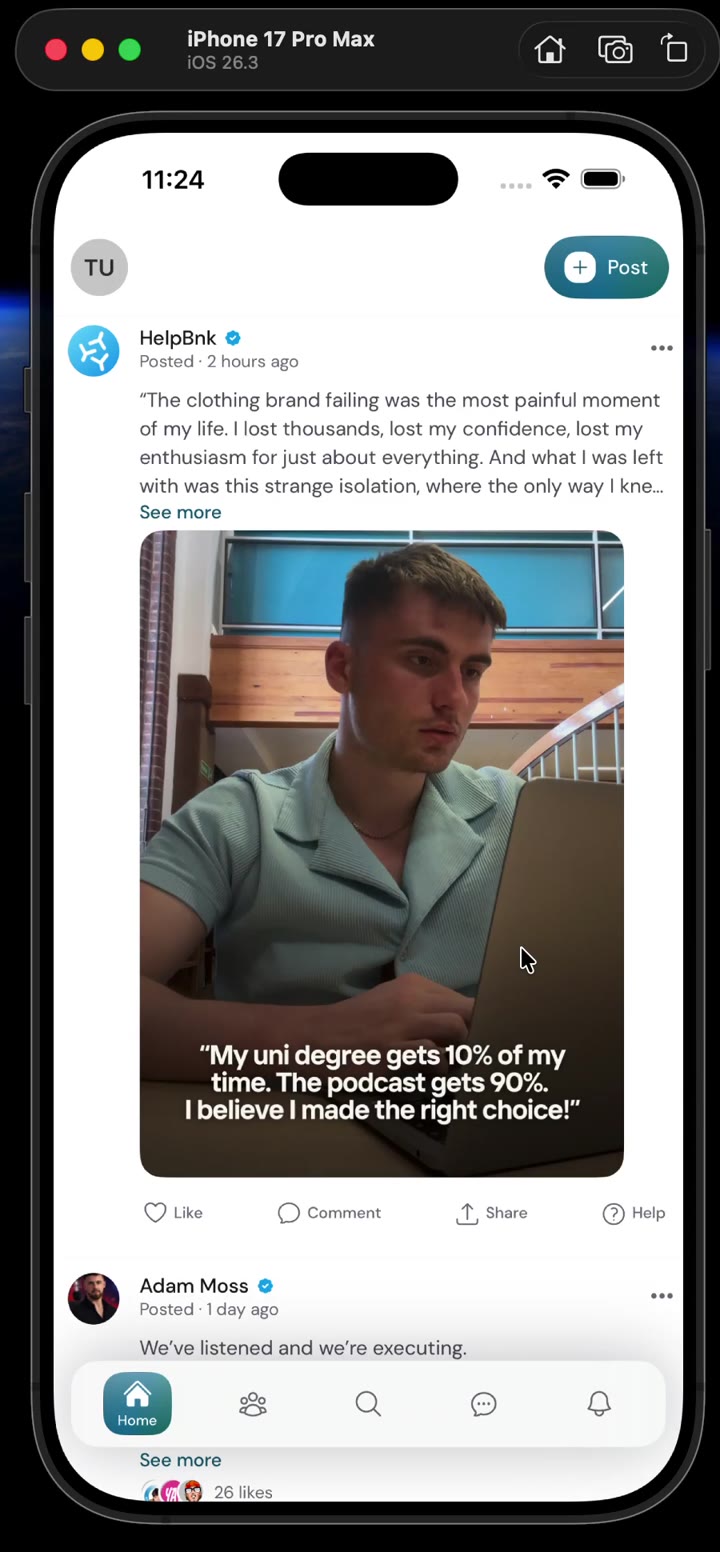
Read the film description
A portrait video leaves its feed frame and returns. An image recovers from several cancelled downward drags before a later dismissal commits. A landscape video then opens into a letterboxed viewer, plays, and returns without a visible restart.
It is tempting to describe this as a shared-element transition. Measure the thumbnail, open an overlay, animate a rectangle, done. That description is almost sufficient for an image. It stops being sufficient as soon as the rectangle contains a playing video.
The video has a clock. The feed can recycle its row. The fullscreen viewer has its own native surface. A downward drag can be cancelled halfway. The user can page to another item before closing. By then, “animate this rectangle” no longer says which video is moving, which view is drawing it, or where it should return.
So we will earn the architecture from the failure, one piece at a time.
Interaction contract
A feed containing images and videos; a horizontally paged fullscreen viewer; tap-to-open; downward interactive dismissal with cancellation; continued playback across the handoff; and a return animation that still works after the feed has moved or recycled the originating row.
Start with the version everyone writes first
Suppose a feed card owns an image or an Expo VideoView. Pressing it stores the
item, opens a fullscreen layer and renders the same URI again:
function FeedCard({ item }: { item: MediaItem }) {
  return (
    <Pressable onPress={() => setOpenItem(item)}>
      {item.type === "image" ? (
        <Image source={{ uri: item.uri }} style={styles.media} />
      ) : (
        <VideoView player={inlinePlayer} style={styles.media} />
      )}
    </Pressable>
  );
}

function Viewer({ item }: { item: MediaItem }) {
  return item.type === "image" ? (
    <Image source={{ uri: item.uri }} style={styles.fullscreen} />
  ) : (
    <VideoView player={viewerPlayer} style={styles.fullscreen} />
  );
}
Add a measured source rectangle and a Reanimated shared value and the image can look convincing. The second image decodes the same asset while the first one is hidden. A still frame is forgiving.
Video exposes what the code actually did. viewerPlayer starts as a new
playback session, so it may seek, buffer or restart. Reusing inlinePlayer
does not automatically solve it: the fullscreen VideoView is still a
different native surface, and readiness of the player does not prove that
surface has drawn a frame. For a few milliseconds the feed and viewer can both
appear, or neither can appear.
The first useful question is therefore not “which easing curve feels right?” It is:
At this exact moment, which native view is responsible for the pixels?
Everything that follows is an answer to that question.
Four facts that must not collapse into one
Take one video card called fox, paused at 12.4 seconds.
- Identity answers which media is this?
foxneeds a key that survives filtering, pagination and duplicate URLs. - Playback answers what is the media doing? It includes the player, playhead, paused state, mute state and playback intent.
- Presentation answers which native view is drawing the pixels? The inline view, a moving overlay or the fullscreen view can take that job.
- Geometry answers where should those pixels be drawn? During a gesture, this is a live rectangle, not just the thumbnail measurement captured at tap time.
These facts often change at different times. During opening, identity remains
fox; playback may continue past 12.4 seconds; presentation leaves the feed;
geometry travels towards fullscreen. Treating them as one isOpen boolean
throws away the distinctions needed to make the handoff reliable.
This is the smallest mental model worth keeping:
same media identity
same playback session
one visible presentation
changing geometry
Figure 01
four facts travel through the same interaction
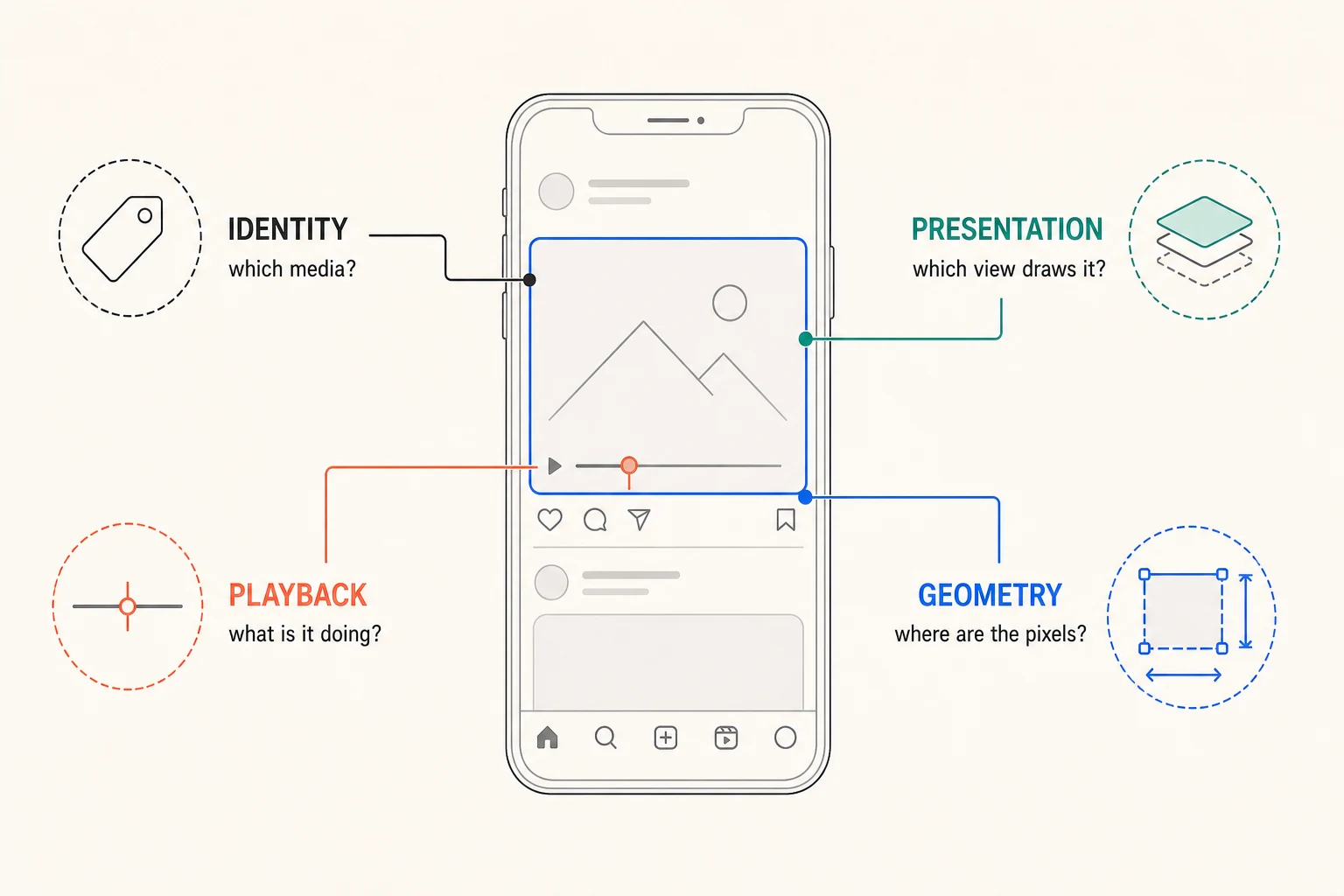
Read the diagram description
A feed video sits at the centre. Four callouts separate its stable media identity, current playback state, active presentation surface and measured geometry.
One object on screen, three places it can live
The interaction should feel as though one object moves through space. In the view hierarchy, that object needs three places to appear:
SourceSurface  →  TransitionSurface  →  ViewerSurface
     feed              temporary           steady state
The source is its place in the feed. The transition surface is a short-lived place above the feed where it can move without being clipped by a row or scroll view. The viewer is its settled place inside the fullscreen pager.
Figure 02
Teleport moves the same native view between hosts
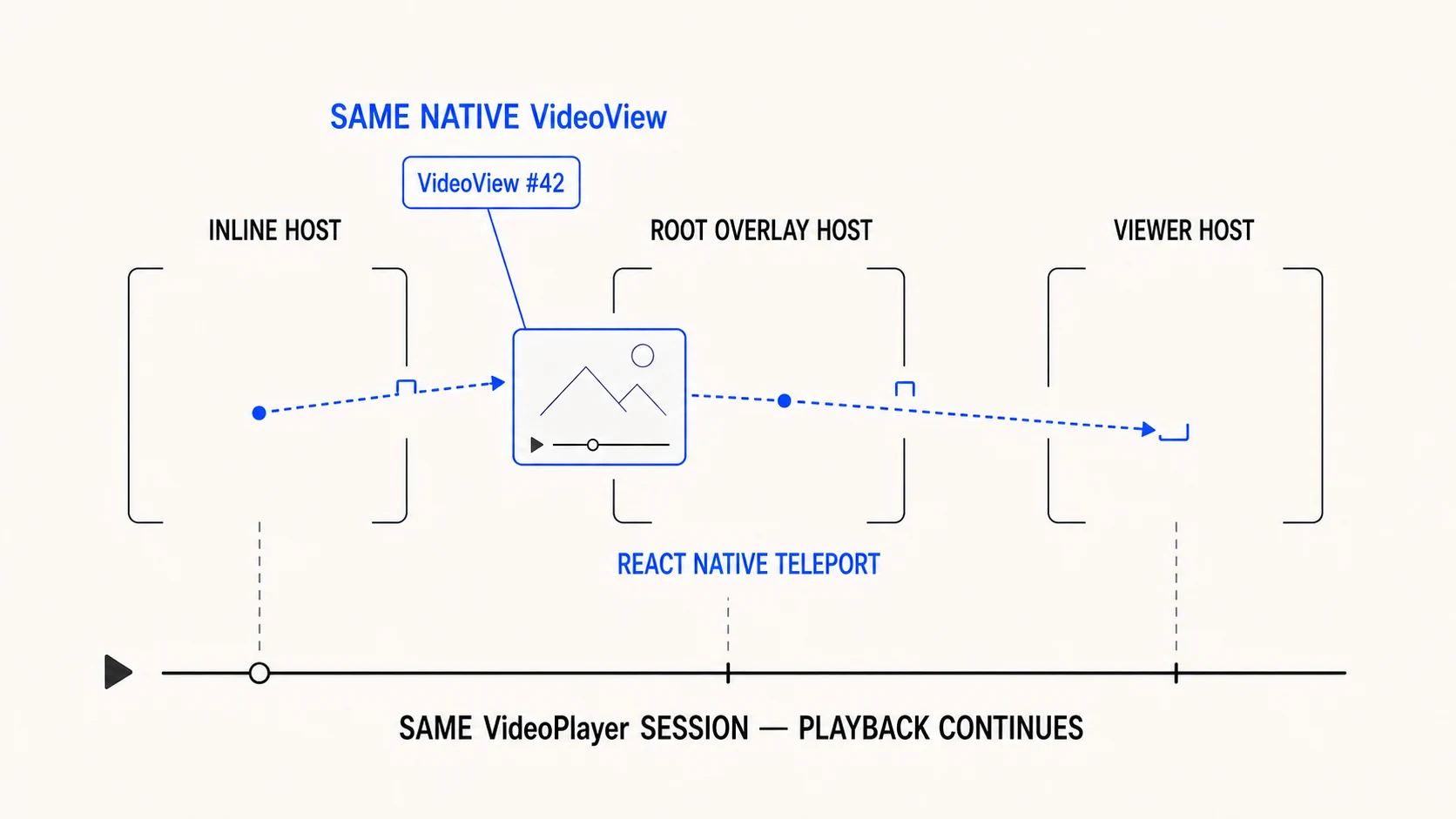
Read the diagram description
Three empty PortalHost destinations sit along one dotted route. The same native VideoView travels that route through React Native Teleport while one player timeline continues below it.
For an image, the transport can be another URI-backed image or a native snapshot. For video, the choice is harder. You can move a live native surface, attach the same player to another surface, or transport a poster while the destination surface prepares. Each strategy transfers different things.
The first type should therefore represent identity, not a component:
export type MediaKey = {
  feedItemId: string;
  mediaIndex: number;
  assetId: string;
};

export type MediaItem =
  | { key: MediaKey; type: "image"; uri: string; aspectRatio: number }
  | {
      key: MediaKey;
      type: "video";
      uri: string;
      posterUri?: string;
      aspectRatio: number;
    };

export function sameMedia(a: MediaKey | null, b: MediaKey | null) {
  return (
    a?.feedItemId === b?.feedItemId &&
    a?.mediaIndex === b?.mediaIndex &&
    a?.assetId === b?.assetId
  );
}
Do not use the URI as identity. Two feed items can point at the same asset. A single post can contain several derived URLs for one video. URLs can change after cache or CDN transformations. Array index alone also fails once the feed prepends, filters or reorders data.
Follow one opening before naming the machinery
Return to fox. At rest, its inline view draws the pixels. The user taps it.
- Measure the feed rectangle while the feed still presents the video.
- Put the visible media in a root overlay at exactly that rectangle.
- Only after the overlay is visible, stop the feed from presenting.
- Animate the overlay towards the contained fullscreen rectangle.
- Prepare the viewer at the destination.
- Give the viewer presentation only when it can show the expected media.
- Remove the temporary overlay.
Notice the ordering in steps 2 and 3. Hiding the feed first produces a blank frame. Showing the overlay first without hiding the feed produces two copies. The transfer needs a brief structural overlap but only one unmasked visual owner.
Closing runs the same sequence in reverse, except that the feed rectangle must be measured again. The user may have scrolled, the list may have recycled the row, or the active gallery item may have changed. The opening rectangle is a memory, not a destination.
A cancelled drag is simpler: do not run the close sequence at all. Spring the same viewer back into place. Keep its page, player and surface alive.
We can now name the rule the interaction has been following:
Source, transport and viewer may all exist, but only one owns visible presentation at a time.
Figure 03
the complete interaction is a sequence of handoffs
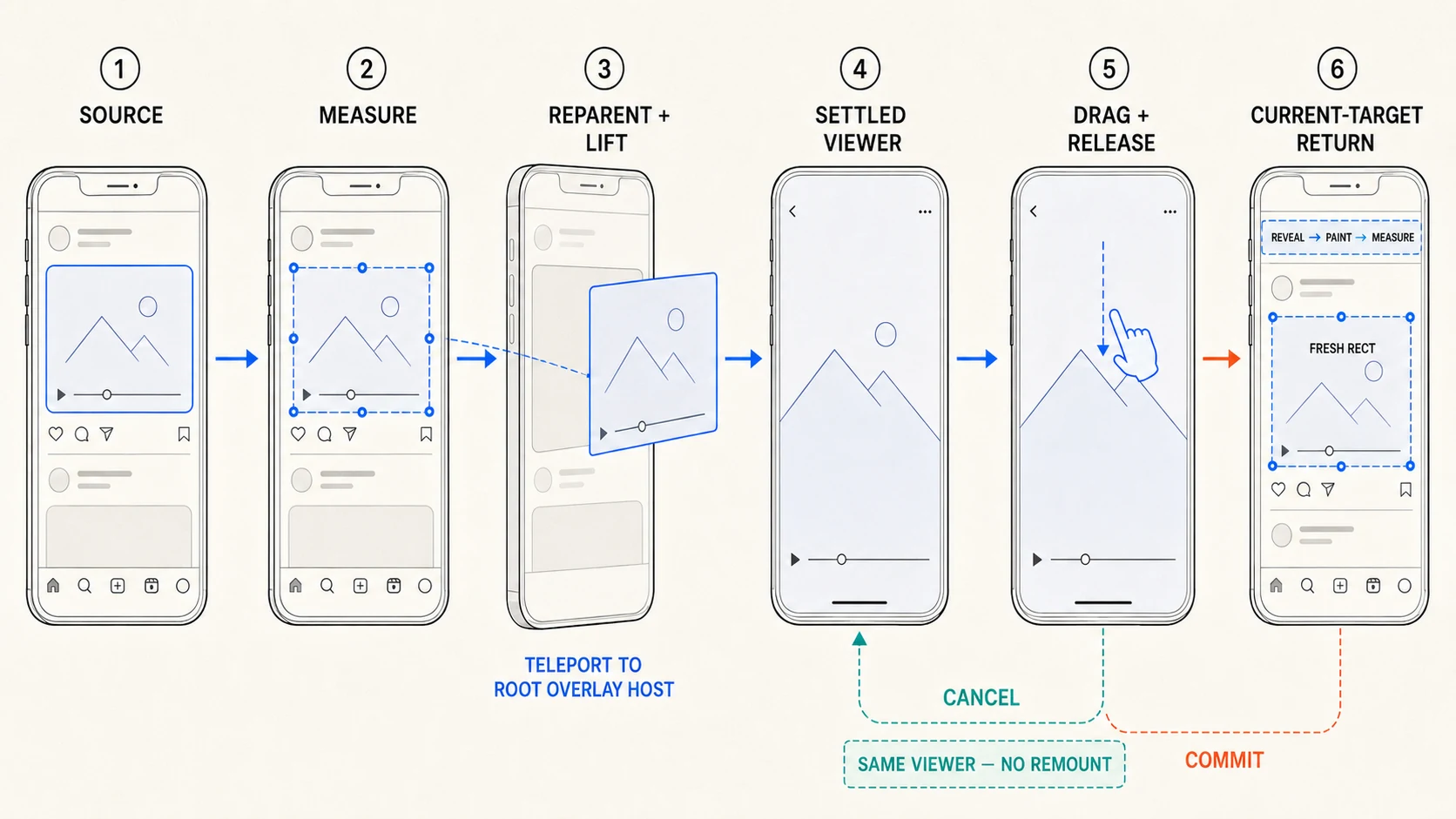
Read the diagram description
Six numbered stages show the source being measured, teleported to the root overlay, settled, dragged and returned. The teal branch restores the same viewer; the orange branch resolves the current target before closing.
Why React Native Teleport is the hinge
There is still a physical problem. The inline video lives beneath a
virtualised row and a scroll view. The transition needs to live above them.
zIndex cannot lift a native view out of ancestors that clip it.
React Native Teleport's Portal
solves that specific problem. It can reparent the existing native view:
the same view gets a new native parent without React unmounting it and creating
another one.
That needs a precise distinction:
- a conventional JavaScript portal renders equivalent React content somewhere else;
- React Native Teleport keeps the component in its original React tree while
physically moving its native view to another
PortalHost; - component state, React context, animation state and—when the transported component is the video surface itself—its attachment to the player can survive the move.
Think of moving a television from one stand to another without turning it off. The programme is the player; the television is the native video surface; the stands are Teleport hosts. Teleport moves the television. It does not choose the programme, calculate the route or decide when the next stand is ready.
The minimum infrastructure is a provider and named hosts:
import {
  Portal,
  PortalHost,
  PortalProvider,
} from "react-native-teleport";

export function AppRoot() {
  return (
    <PortalProvider>
      <Navigation />
      <PortalHost
        name="media-overlay"
        style={StyleSheet.absoluteFill}
      />
    </PortalProvider>
  );
}
The active media surface stays wrapped by one Portal. Changing hostName
changes its native parent:
function RoutedMediaSurface({
  destination,
  children,
}: {
  destination: "inline" | "overlay" | "viewer";
  children: React.ReactNode;
}) {
  const hostName =
    destination === "overlay"
      ? "media-overlay"
      : destination === "viewer"
        ? "media-viewer"
        : undefined;

  return <Portal hostName={hostName}>{children}</Portal>;
}
undefined leaves the surface in place inside the feed. "media-overlay"
moves it to a root host where row clipping no longer applies.
"media-viewer" hands it to a host mounted by the active fullscreen page.
Closing reverses the route.
inline parent
→ root overlay host
→ active viewer host
→ root overlay host
→ inline parent
The outer feed slot must remain mounted and retain its measured size while its child is away. Otherwise the list reflows at the same moment the opening geometry is supposed to remain stable.
Teleport does not decide media identity, measure the source, animate the
rectangle, arbitrate gestures, preserve a VideoPlayer, prove the first
visible frame or find a recycled return target. It only makes the ownership
transfer physically possible without recreating the transported native view.
The coordinator decides when each host may own presentation.
For images, you may still choose a separate URI-backed bridge rather than move
the original image view. For video, moving the same VideoView is more
valuable because the surface can remain attached to the same app-owned player.
Platform constraints can still force a poster bridge or a second surface
attached to that player. Teleport is therefore a transport primitive, not a
promise that every platform should use the same transport plan.
There are two operational constraints worth knowing before adopting it.
React Native Teleport requires React Native's New Architecture,
and because it contains native code it needs an
Expo development build
rather than Expo Go. A host also belongs to a particular native window. If the
viewer uses a native modal or dialog, mount the destination PortalHost inside
that modal’s window instead of assuming the app-root host can appear above it.
The examples from here use React Native, React Native Teleport, Expo Video, React Native Reanimated, React Native Gesture Handler and React Native Pager View. The same ownership model can use different tools, but a replacement for Teleport must preserve the native-view continuity the interaction depends on.
Turn the sequence into a state machine
You do not need a state-machine library, but you do need state-machine semantics. We have already described states in plain language: measuring, opening, waiting for the viewer, settled, dragging, cancelling and closing. Giving them names prevents impossible combinations.
Distributed booleans such as isOpen, isClosing,
viewerReady and showPoster become dangerous when an asynchronous
measurement or native callback arrives after the active item changes.
A useful phase model is:
export type ContinuityPhase =
  | "idle"
  | "measuringSource"
  | "opening"
  | "preparingViewer"
  | "settled"
  | "dragging"
  | "cancelling"
  | "resolvingReturnTarget"
  | "closing"
  | "handingBack"
  | "failed";

export type PresentationOwner =
  | "source"
  | "transport"
  | "viewer"
  | "none";

export type ContinuitySession = {
  token: number;
  key: MediaKey;
  phase: ContinuityPhase;
  owner: PresentationOwner;
  sourceFrame: MeasuredFrame | null;
  returnFrame: MeasuredFrame | null;
};
Every opening receives a monotonically increasing token. The token travels through measurements, player callbacks, first-frame events and return-target requests:
const token = coordinator.beginOpen(item.key);
const source = await registry.measure(item.key);

if (!coordinator.matches(token, item.key)) return;
if (!source) return coordinator.fail(token, "source-unavailable");

coordinator.commitSourceMeasurement(token, source);
This is not defensive ceremony. A user can tap item A, close it, scroll and tap item B before item A's measurement or video callback returns. Without both token and identity checks, stale work can acquire presentation authority inside the new session.
The ownership table is the core of the design:
| Phase | Presentation owner | Playback owner | Geometry authority |
|---|---|---|---|
| Idle | Source | Inline session | Source registry |
| Measuring | Source | Inline session | Source registry + token |
| Opening | Transport | Existing player session | Opening plan |
| Preparing viewer | Transport or poster | Existing player session | Viewer stage |
| Settled | Viewer | Active viewer page | Viewer |
| Dragging | Viewer/drag stage | Viewer session | Gesture shared values |
| Cancelling | Viewer/drag stage | Viewer session | Cancellation spring |
| Resolving return | Viewer | Viewer session | Fresh registry request |
| Closing | Transport | Viewer session until handback | Locked return plan |
| Handing back | Source | Inline session | Current source |
Temporary overlap can exist in the native hierarchy. What matters is that
visibility policy still declares one presentation owner. A destination
VideoView may be mounted beneath a poster while it prepares; it does not own
presentation until the expected surface produces the expected media frame.
One complete transaction, without hand-waving
It is easier to see the machinery when we stop speaking in nouns. Take one landscape video in the feed and follow a single opening all the way home.
The row is already registered under
feed-item-42:0:asset-fox. Its layout slot owns presentation and contains a
named inline Teleport host. The application-owned player is playing into one
VideoView; that view is not owned by the row's React lifetime. It is rendered
higher in the tree and routed into the row's host.
The user taps. The coordinator allocates token 81, then asks the registry to
measure that full media key in window coordinates. If the measurement comes
back after token 82 has started, it becomes a historical curiosity and
nothing more. For token 81, the measurement is current, so the coordinator
locks an opening plan from that rectangle to the viewer's contained rectangle.
Now the visible handoff begins:
81  OPEN_REQUESTED             owner=source
81  SOURCE_MEASURED            key=feed-item-42:0:asset-fox
81  TRANSPORT_MOUNTED          host=media-overlay
81  SOURCE_PRESENTATION_LEFT   owner=transport
81  OPEN_STARTED               surface=teleported-video-surface
81  VIEWER_HOST_READY          host=media-viewer
81  VIEWER_OWNS_PRESENTATION   owner=viewer
TRANSPORT_MOUNTED is the important seam. The overlay host exists at the
source rectangle before the inline presentation yields. Then the same
VideoView is reparented from the named inline host to the root overlay host.
The feed slot remains in layout, but its pixels are away. The overlay host—not
the list row—animates towards the viewer rectangle.
At the end of that geometry animation, the active pager page has mounted its viewer host. Teleport reparents the same native video view again:
media-inline:feed-item-42:0:asset-fox
→ media-overlay
→ media-viewer
There is no second Android VideoView competing for the player and no new
player waiting to seek to the old time. If your platform path substitutes a
different destination surface, this is precisely where the poster must remain
until that expected surface emits its first visible frame. Do not borrow the
same-surface exemption for a two-surface implementation.
Suppose the user drags down and changes their mind. The viewer enters
dragging, the media rectangle and scrim follow shared values, and release
policy returns cancel. The existing values spring back to zero. The pager
does not remount, the player is not reacquired and no close cleanup runs. Only
when the spring finishes does the session become settled again.
On the next drag, release policy commits. The viewer still owns presentation
while the registry reveals feed-item-42, asks its current gallery to show
media index 0, waits for layout, then measures
feed-item-42:0:asset-fox again. That new rectangle may have nothing in common
with the opening rectangle. Once the identity and measurement version pass,
the coordinator locks the return plan, moves the one video surface from the
viewer host to the overlay host and begins from the current drag geometry,
not the old settled viewer rectangle.
At the final frame, the inline host is known to exist. Teleport routes the surface home, the source takes presentation ownership, and only then is the transaction released:
81  DISMISS_COMMITTED
81  RETURN_REVEAL_REQUESTED
81  RETURN_TARGET_MEASURED     version=19
81  CLOSE_STARTED              owner=transport
81  SOURCE_OWNS_PRESENTATION   host=media-inline:feed-item-42:0:asset-fox
81  SESSION_RELEASED
That is the whole trick in operational form. The curves can change. Those ordering constraints cannot.
Register sources without making feed rows expensive
A production feed is virtualised. Rows mount, unmount and can be recycled for different items. Keeping a React ref in the viewer is insufficient because that ref can become stale before dismissal.
Use a registry keyed by media identity:
export type Rect = {
  x: number;
  y: number;
  width: number;
  height: number;
};

export type MeasuredFrame = {
  key: MediaKey;
  rect: Rect;
  version: number;
  measuredAt: number;
};

export interface MeasurementRegistry {
  register(key: MediaKey, ref: React.RefObject<View | null>): () => void;
  measure(key: MediaKey): Promise<MeasuredFrame | null>;
  reveal(key: MediaKey): Promise<void>;
}
The row registers its native host, not the viewer:
function FeedMedia({ item }: { item: MediaItem }) {
  const hostRef = useRef<View>(null);

  useEffect(
    () => measurementRegistry.register(item.key, hostRef),
    [item.key.feedItemId, item.key.mediaIndex, item.key.assetId],
  );

  return (
    <View ref={hostRef} collapsable={false}>
      <InlineMedia item={item} />
    </View>
  );
}
collapsable={false} matters when a native measurement depends on that view
surviving React Native's view flattening.
Use React Native's
measureInWindow
so the transport and fullscreen overlay share one coordinate space:
function measureInWindowAsync(ref: React.RefObject<View | null>) {
  return new Promise<Rect | null>((resolve) => {
    ref.current?.measureInWindow((x, y, width, height) => {
      if (width <= 0 || height <= 0) return resolve(null);
      resolve({ x, y, width, height });
    });
  });
}
Do not hide platform offsets inside animation math. Normalize them once at the measurement boundary and record which coordinate space the resulting rectangle uses.
The registry should not live in every row's global-store subscription. Rows register and unregister their refs. The coordinator subscribes to the active session. A recycled list already has enough work; it should not rerender its visible rows at 60 or 120 updates per second because one media item is being dragged elsewhere.
Plan geometry before mounting the viewer
Opening needs a source rectangle and a destination rectangle. The destination is the largest rectangle that preserves the media aspect ratio inside the viewer stage:
export function containRect(
  stage: Rect,
  mediaAspectRatio: number,
): Rect {
  const stageRatio = stage.width / stage.height;

  if (mediaAspectRatio > stageRatio) {
    const height = stage.width / mediaAspectRatio;
    return {
      x: stage.x,
      y: stage.y + (stage.height - height) / 2,
      width: stage.width,
      height,
    };
  }

  const width = stage.height * mediaAspectRatio;
  return {
    x: stage.x + (stage.width - width) / 2,
    y: stage.y,
    width,
    height: stage.height,
  };
}
Interpolate edges or centers, but do it consistently. Center interpolation is easy to reason about:
const lerp = (a: number, b: number, t: number) => a + (b - a) * t;

export function interpolateRect(from: Rect, to: Rect, t: number): Rect {
  const fromCx = from.x + from.width / 2;
  const fromCy = from.y + from.height / 2;
  const toCx = to.x + to.width / 2;
  const toCy = to.y + to.height / 2;

  const width = lerp(from.width, to.width, t);
  const height = lerp(from.height, to.height, t);
  const cx = lerp(fromCx, toCx, t);
  const cy = lerp(fromCy, toCy, t);

  return { x: cx - width / 2, y: cy - height / 2, width, height };
}
The transport owns these values during opening. The source should not continue showing identical pixels underneath it. Keep the row's layout slot, but make its presentation transparent only after the transport has mounted with a valid source.
Image transport can be simple
For images, mount a new URI-backed transition surface in the root overlay. It does not need to be the original native image view. It needs the same source, crop, recycling key and aspect ratio.
The opening order is:
measure source
→ mount transition image at source rect
→ hide inline image pixels
→ animate transition image to viewer rect
→ mount/confirm viewer image
→ hide transition image
→ viewer owns presentation
Closing performs the inverse. During an interactive drag, the active viewer surface can itself become the drag stage. Once dismissal commits and a valid return target exists, a dedicated return bridge gives you tighter control over crop, corner radius and final handback.
The backdrop should derive from the same interaction progress but remain a separate animated surface:
const visualProgress = Math.min(1, Math.max(0, dragY / commitDistance));

const mediaScale = interpolate(visualProgress, [0, 1], [1, targetScale]);
const scrimOpacity = interpolate(visualProgress, [0, 1], [1, 0]);
const radius = interpolate(visualProgress, [0, 1], [0, targetRadius]);
Keeping the backdrop separate prevents a late media measurement from changing the perceived response of the whole screen.
Video is a player plus a presentation surface
Expo Video's player is not
the pixels. On iOS,
AVPlayer
is a nonvisual playback object; an AVPlayerLayer or player view controller
presents it. On Android, the player renders into a SurfaceView or
TextureView.
This is the same separation we used earlier, now expressed in platform terms. The player owns the timeline; the surface owns the visible frame. You can keep hearing audio from a healthy player while its surface is black, detached or covered by a poster. Conversely, a poster can look like paused video while no player is ready underneath it.
That explains why “the player never stopped” is not proof of continuity. The handoff must preserve playback and keep one valid presentation visible.
This distinction is the reason a correct image transition can still fail for video. Playback may continue while the visible surface disappears. A poster can remain above a healthy player. Two surfaces can briefly compete for the same player. A readiness event can arrive before the destination has shown a frame.
Do not create the continuity player with
useVideoPlayer
inside each inline and fullscreen component. That ties player lifetime to
component lifetime, which is exactly what the handoff is crossing. Expo exposes
createVideoPlayer
for advanced cases where the application owns disposal.
A small registry can own one active continuity session:
type PlaybackSnapshot = {
  currentTime: number;
  playing: boolean;
  muted: boolean;
  capturedAt: number;
};

type VideoSession = {
  id: number;
  key: MediaKey;
  player: VideoPlayer;
  owner: "inline" | "viewer";
  firstVisibleSurfaceId: string | null;
  intent: PlaybackSnapshot;
};

class VideoSessionRegistry {
  private active: VideoSession | null = null;
  private nextId = 1;

  acquire(item: Extract<MediaItem, { type: "video" }>) {
    if (this.active && sameMedia(this.active.key, item.key)) {
      return this.active;
    }

    this.release();

    const player = createVideoPlayer(item.uri);
    player.loop = true;

    this.active = {
      id: this.nextId++,
      key: item.key,
      player,
      owner: "inline",
      firstVisibleSurfaceId: null,
      intent: {
        currentTime: 0,
        playing: false,
        muted: true,
        capturedAt: Date.now(),
      },
    };

    return this.active;
  }

  release() {
    this.active?.player.release();
    this.active = null;
  }
}
Production code also needs listener cleanup, source-replacement queues, backgrounding, native-object invalidation and stale-session checks. Keep those inside the registry rather than duplicating them between inline and viewer components.
Do not release the poster on readyToPlay
There are at least six different facts:
type VideoPresentationState = {
  playerReady: boolean;
  destinationSurfaceMounted: boolean;
  destinationFirstFrameVisible: boolean;
  posterVisible: boolean;
  playbackIntent: "playing" | "paused";
  actuallyPlaying: boolean;
};
They must not collapse into one isReady boolean.
readyToPlay says the player can begin. A time update says the playhead moved.
Neither proves that the destination surface has displayed a frame. Expo
Video's
onFirstFrameRender
exists for the point at which the mounted player has rendered into that
VideoView.
Gate it by both surface and media identity:
function ViewerVideo({
  session,
  surfaceId,
  posterUri,
}: {
  session: VideoSession;
  surfaceId: string;
  posterUri?: string;
}) {
  const [firstFrameVisible, setFirstFrameVisible] = useState(false);

  return (
    <View style={StyleSheet.absoluteFill}>
      <VideoView
        player={session.player}
        style={StyleSheet.absoluteFill}
        contentFit="contain"
        nativeControls={false}
        surfaceType="textureView"
        onFirstFrameRender={() => {
          if (!videoRegistry.matches(session.id, session.key, surfaceId)) return;
          videoRegistry.markVisible(session.id, session.key, surfaceId);
          setFirstFrameVisible(true);
        }}
      />

      {!firstFrameVisible && posterUri ? (
        <Image
          source={{ uri: posterUri }}
          style={StyleSheet.absoluteFill}
          resizeMode="contain"
        />
      ) : null}
    </View>
  );
}
Reset the frame flag when the video track or expected surface changes. Expo documents that the callback can occur again after a track switch.
A playhead-based timeout can prevent a poster from remaining forever after a lost callback, but treat it as a recovery heuristic. It is not evidence that the viewer displayed the correct pixels.
Figure 04
player ready is not first visible frame
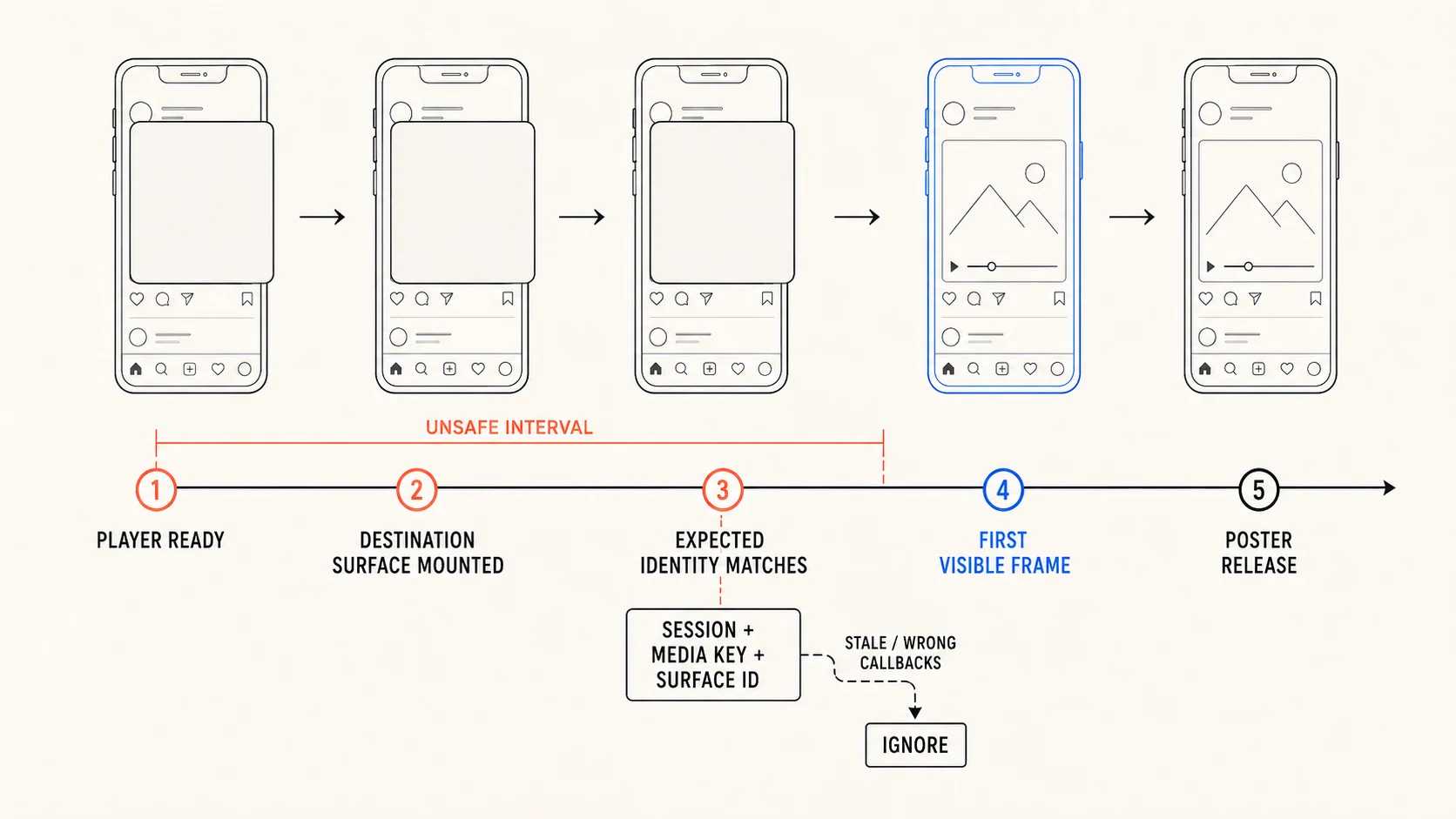
Read the diagram description
A five-stage timeline separates player readiness, destination mounting, identity matching, first-frame proof and poster release. Stale or mismatched callbacks leave the gate through an ignore path.
iOS: move or reattach the player layer deliberately
The production iOS path required native work because ordinary component lifecycle did not provide the surface control needed for a reliable handoff. The reusable mechanism is:
- Use an
AVPlayerLayerwhen the application owns controls. - Retain the same
AVPlayer. - Attach it to a lifted, window-level transition view.
- Animate that transition view between measured rectangles.
- Observe the destination layer's
isReadyForDisplay. - Hide or detach the previous surface only under the ownership policy.
- Restore the inline attachment after return.
Apple defines
AVPlayerLayer.isReadyForDisplay
as the point at which the first frame of the current item is ready for display.
It is observable, which makes it suitable for a native-to-JavaScript
first-visible-frame event.
Keep the patched native surface behind a narrow adapter:
export interface NativeVideoTransitionAdapter {
  canMoveLiveSurface(): boolean;
  open(input: {
    sessionId: number;
    source: Rect;
    destination: Rect;
    cornerRadius: number;
  }): Promise<void>;
  close(input: {
    sessionId: number;
    source: Rect;
    destination: Rect;
    cornerRadius: number;
  }): Promise<void>;
  cancel(sessionId: number): Promise<void>;
}
Do not let the rest of the viewer call arbitrary native transition methods. The coordinator decides ownership; the platform adapter carries out one bounded surface operation.
When maintaining a patch against Expo Video, record the exact upstream version, assert the expected original file before applying the patch, and fail the build when the target changes. Full-file native replacements that silently apply to a new Expo release are an invitation to undefined behaviour.
Android: choose the surface model for the interaction
Expo Video defaults to surfaceView.
Android's Media3 surface guidance
recommends SurfaceView for ordinary playback because it generally uses less
power, offers better frame timing and supports capabilities such as secure
output.
This viewer is not ordinary playback. The surface participates in clipping,
rounded corners, overlays, paging and animated geometry. TextureView lives
inside the normal view hierarchy, which makes it the practical choice when a
video must overlap or transform with React Native content.
That trade is explicit:
| Surface | Prefer when | Cost or limitation |
|---|---|---|
SurfaceView | Stable, non-overlapping playback | Separate surface composition complicates clipping, z-order and some transforms |
TextureView | Animated, clipped or overlapping viewer surfaces | Higher power cost and fewer specialised output capabilities |
Set the
surfaceType
when mounting the view. Expo warns against changing it at runtime:
<VideoView
  player={session.player}
  surfaceType="textureView"
  useExoShutter={false}
  nativeControls={false}
/>
Disabling
useExoShutter
prevents the default ExoPlayer shutter from becoming an unplanned visual owner
before the first frame. Your own poster policy then controls what covers the
destination surface.
Expo also documents
an Android limitation: mounting several VideoView instances with the same
player does not work as a general handoff technique. Keep the active surface
count bounded. During motion, prefer one routed surface or a poster transport
rather than assuming two live views can safely share the player.
Do not force iOS and Android through the same visual implementation merely to keep the component tree symmetrical. They can share the ownership contract while using different transports.
Film 02
landscape video makes a dishonest handoff obvious
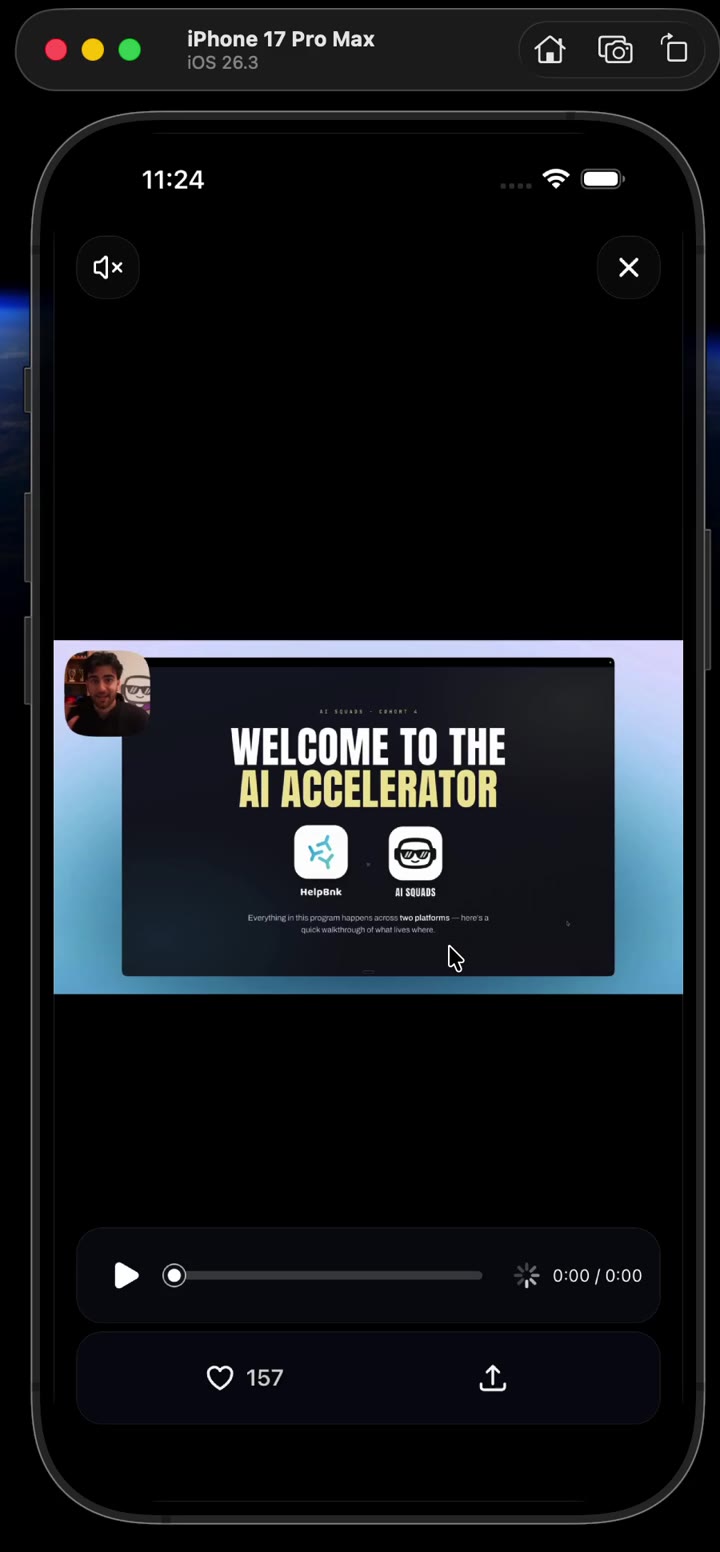
Read the film description
The feed scrolls to a landscape video, opens it into a letterboxed fullscreen viewer, begins playback, and closes it to the current feed rectangle. Controls and play state remain coherent across the return.
The settled viewer owns paging
Once opening settles, transport should stop being the architecture. The fullscreen pager owns page identity, adjacent rendering and horizontal interaction.
Render the active page and a small adjacent window. Only the active video page may acquire the playback session:
function GalleryPage({
  item,
  active,
}: {
  item: MediaItem;
  active: boolean;
}) {
  if (item.type === "image") {
    return <ViewerImage item={item} />;
  }

  return active ? (
    <ActiveViewerVideo item={item} />
  ) : (
    <VideoPoster item={item} />
  );
}
When the pager selects a new page:
- Update the active
MediaKey. - Pause the previous video by identity.
- Prepare or replace the player source through the registry.
- Reset the expected surface and first-frame state.
- Keep the new poster until that surface reports its frame.
Do not allow an inactive page's delayed callback to mark the active page ready. The same session, token, key and surface checks used during opening apply here.
The user drags the viewer, not the bitmap
A portrait image fills most of a portrait screen. A landscape video does not. If the downward dismiss gesture wraps only the media rectangle, letterboxed space becomes dead even though the user still perceives it as part of the viewer.
Wrap the full viewport, including the pager:
<GestureDetector gesture={viewerGesture}>
  <AnimatedPagerView style={StyleSheet.absoluteFill}>
    {pages}
  </AnimatedPagerView>
</GestureDetector>
Horizontal paging and vertical dismissal begin from similar touch streams. A
generic Pan that activates automatically will sometimes steal the pager. Use
manual activation to classify intent:
const verticalLead = 1.2;
const activateY = 8;
const failX = 14;

const dismissPan = Gesture.Pan()
  .manualActivation(true)
  .maxPointers(1)
  .shouldCancelWhenOutside(false)
  .onTouchesMove((event, state) => {
    const touch = event.allTouches[0];
    if (!touch) return;

    const dx = touch.absoluteX - startX.value;
    const dy = touch.absoluteY - startY.value;

    if (dy < 0 && Math.abs(dy) > Math.abs(dx)) {
      state.fail();
      return;
    }

    if (Math.abs(dx) >= failX && Math.abs(dx) > Math.abs(dy) * verticalLead) {
      state.fail(); // native pager wins
      return;
    }

    if (dy >= activateY && dy > Math.abs(dx) * verticalLead) {
      state.activate();
    }
  });

const pagerNative = Gesture.Native();
const viewerGesture = Gesture.Simultaneous(dismissPan, pagerNative);
Gesture Handler's native gesture brings the pager's native recognizer into the same gesture-composition graph. Continuous translation stays on the UI runtime. Cross into JavaScript only after a release decision needs async measurement, navigation or player orchestration.
Controls must have an explicit relationship with the gesture region. A scrubber should not begin vertical dismissal while seeking. An empty region around the controls should still belong to the viewer. Test hit regions rather than assuming z-index also defines recognizer priority.
Figure 05
the whole viewport participates in the gesture arena
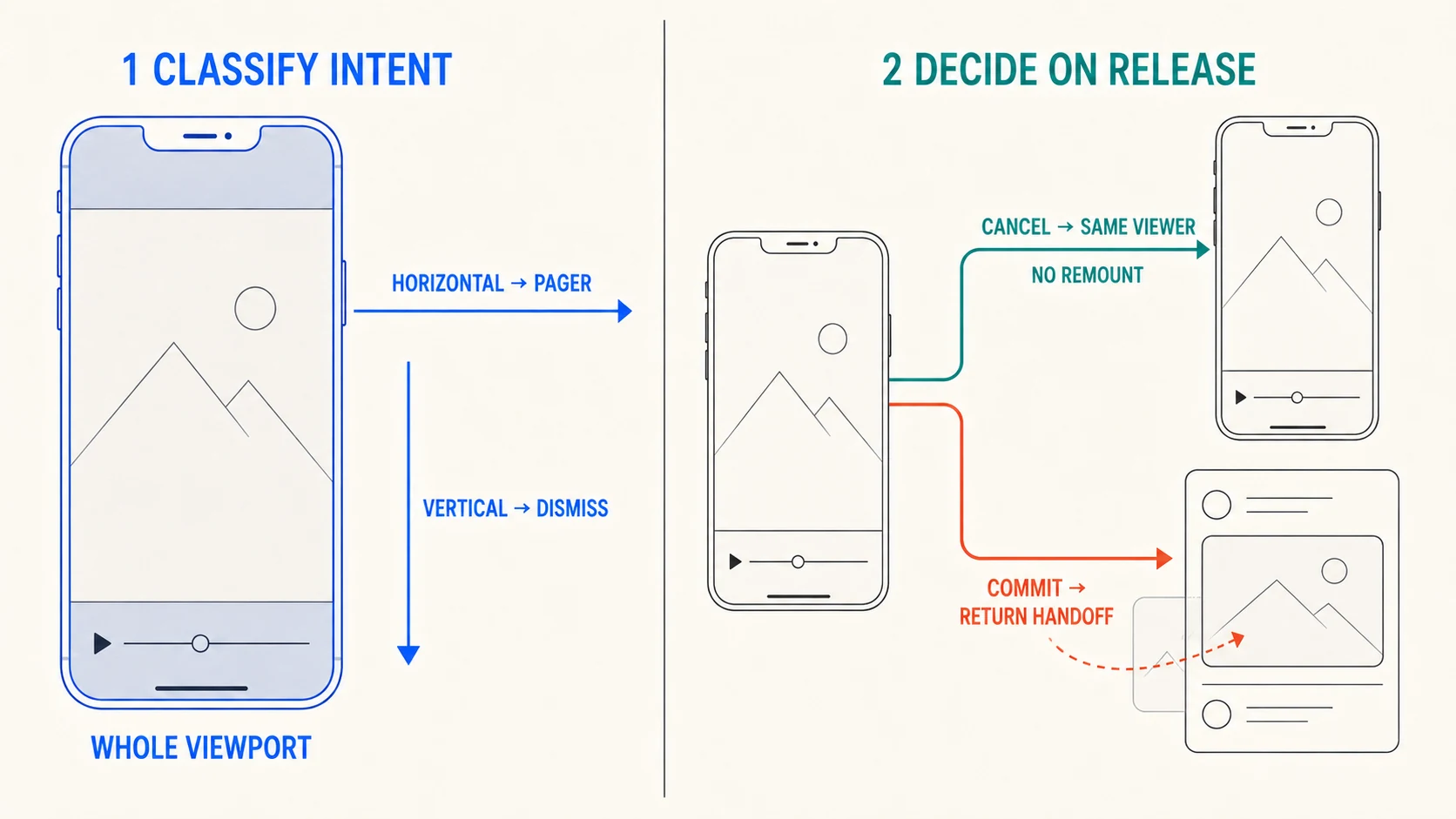
Read the diagram description
Two large panels separate gesture arbitration from release policy. The whole viewport participates, including letterbox space. A cancelled release does not remount; a committed release returns the media to its feed rectangle.
Cancellation cannot recreate the viewer
Interactive dismissal has two outcomes:
type ReleaseDecision =
  | { kind: "cancel" }
  | { kind: "commit"; projectedDistance: number };
Use distance, velocity and projection:
export function decideRelease(input: {
  dragY: number;
  velocityY: number;
  dismissDistance: number;
}): ReleaseDecision {
  const progress = input.dragY / input.dismissDistance;
  const projected = input.dragY + Math.max(0, input.velocityY) * 0.18;

  const commit =
    progress >= 0.32 ||
    (progress >= 0.1 &&
      (input.velocityY >= 600 ||
        projected >= input.dismissDistance * 0.48));

  return commit
    ? { kind: "commit", projectedDistance: projected }
    : { kind: "cancel" };
}
These are starting values, not universal constants.
On cancellation, animate the same Reanimated shared values back to their settled values. Do not dismiss and reopen the overlay. Do not reacquire the player. Do not change page identity.
function cancelDismissal() {
  phase.value = "cancelling";

  dragY.value = withSpring(0, cancelSpring, (finished) => {
    if (!finished) return;
    phase.value = "settled";
  });

  dragScale.value = withSpring(1, cancelSpring);
  scrimOpacity.value = withTiming(1, { duration: 120 });
  cornerRadius.value = withSpring(0, cancelSpring);
}
This is why cancellation deserves a named state. Treating it as “the gesture
ended but close returned false” makes it easy for effects tied to isClosing
to dismantle the viewer before the recovery spring completes.
Film 03
cancellation is a real state, not a failed close
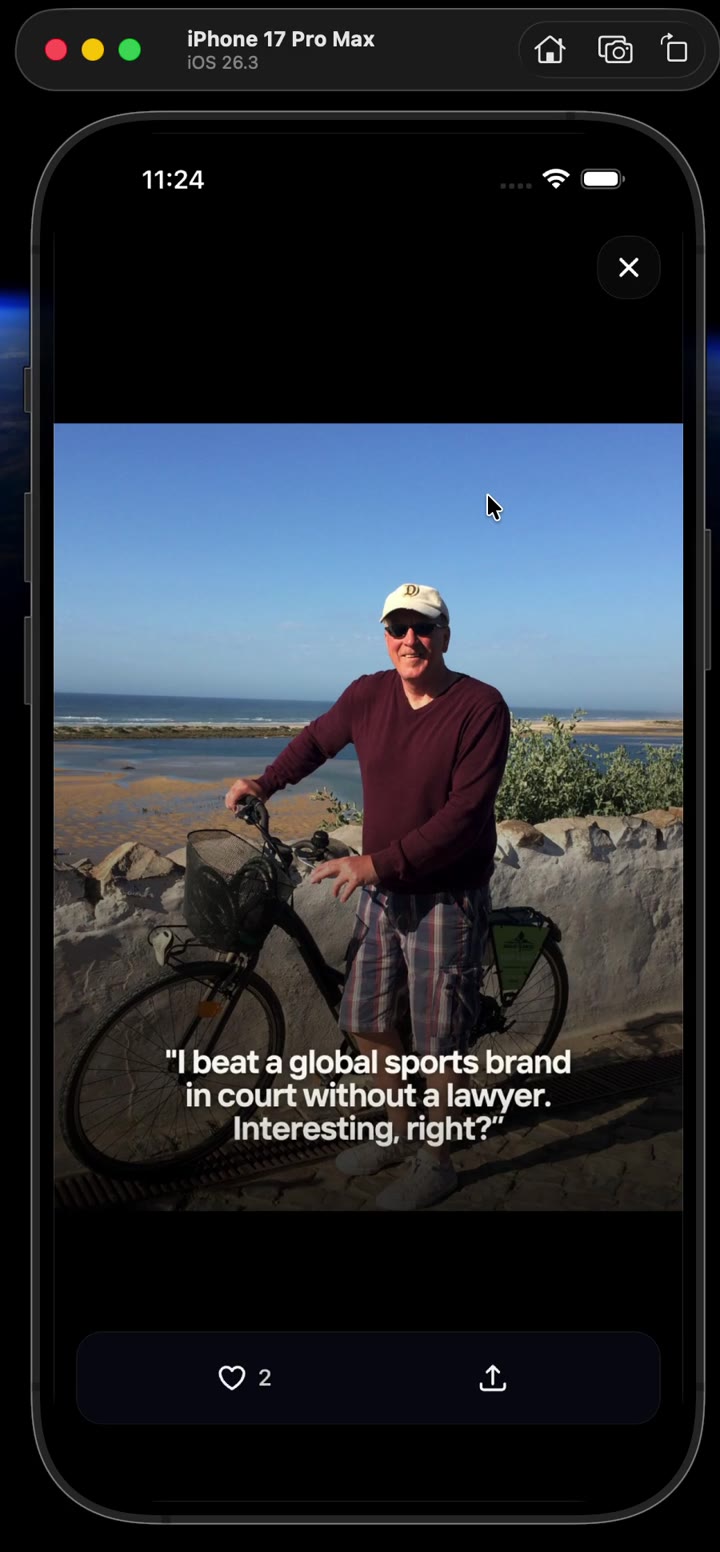
Read the film description
A portrait image opens into the viewer. Multiple short downward drags return it to fullscreen without changing media identity. A longer release then commits dismissal to the feed.
Closing needs a current target
When dismissal commits, ask the feed to reveal and measure the current media key:
async function resolveReturnTarget(
  session: ContinuitySession,
): Promise<MeasuredFrame | null> {
  await registry.reveal(session.key);
  await nextLayoutFrame();

  const measured = await registry.measure(session.key);
  if (!measured) return null;
  if (!sameMedia(measured.key, session.key)) return null;

  return measured;
}
For a multi-item feed post, reveal may first update the inline gallery to the
viewer page. If the row is offscreen, it may scroll without animation, wait for
layout, then retry measurement. Every successful measurement increments a
version.
A practical close sequence:
- Freeze the release geometry.
- Ask the feed to reveal the active key.
- Use a matching cached rectangle only if it is recent and versioned.
- Start return immediately when the cached target is credible.
- Accept one fresh retarget early in the return animation.
- Lock geometry after the retarget cutoff.
- If no target exists, fade/direct-dismiss rather than animating to fiction.
- Hand the player back or pause it according to captured intent.
Figure 06
the opening rectangle cannot be trusted on return
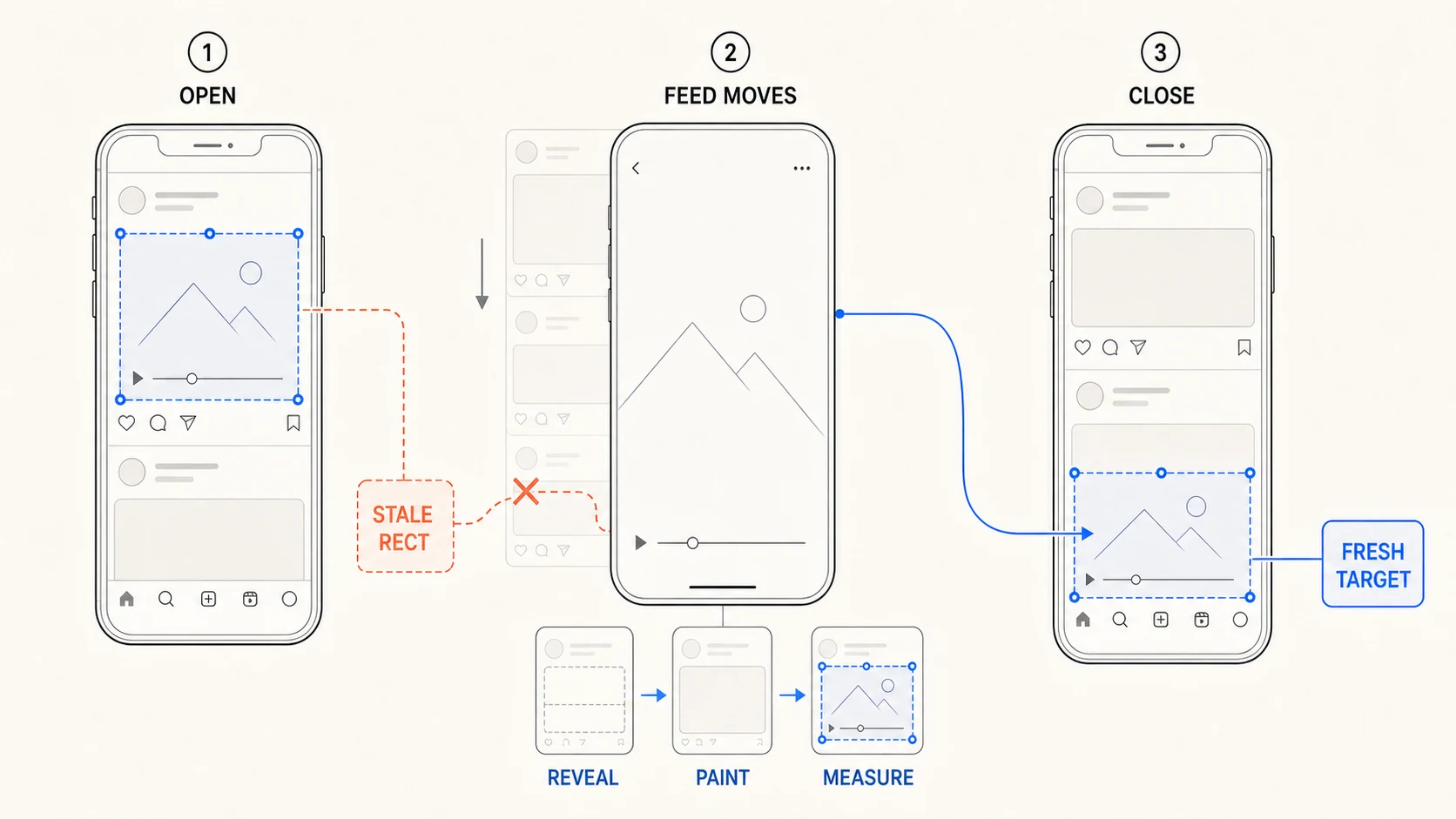
Read the diagram description
The original opening rectangle becomes stale after the feed moves. A reveal, paint and measure sequence resolves the current media rectangle before the closing handoff begins.
Late retargeting is worse than a fallback. If the destination jumps near the end, the system converts measurement accuracy into visible instability.
Playback handback is separate from presentation handback
Suppose the inline video was playing when the user opened it. The viewer uses the same player and continues playback. When the surface returns, the inline host should resume presenting the same session.
Suppose it was paused. Opening should not invent playback merely because the viewer mounted.
Capture intent:
function capturePlayback(player: VideoPlayer): PlaybackSnapshot {
  return {
    currentTime: player.currentTime,
    playing: player.playing,
    muted: player.muted,
    capturedAt: Date.now(),
  };
}
If playback intentionally continues while transport work runs, projected time can account for elapsed wall time:
function projectedTime(snapshot: PlaybackSnapshot) {
  if (!snapshot.playing) return snapshot.currentTime;
  return snapshot.currentTime + (Date.now() - snapshot.capturedAt) / 1000;
}
Apply intent only after confirming the active session and player identity. Presentation can return before audio or playback is allowed to continue, so model audible ownership explicitly if the application ever permits more than one prepared player.
App lifecycle and native failure are part of the transition
A viewer can background while opening, while playing, during a cancelled drag or while waiting for a return target.
The continuity coordinator needs policies for:
- background: pause and record a lifecycle pause reason;
- foreground: resume only if the pause was lifecycle-owned and the session is still active;
- player invalidation: clear listeners, release and fall back to poster;
- missing source on close: pause or hand back deterministically, then direct-dismiss;
- unresolved opening: watchdog to restore the inline owner;
- unresolved return spring: visual-rest finalizer plus watchdog;
- rotation: invalidate measurement versions and rebuild the stage;
- reduced motion: crossfade or immediate ownership transfer without spatial movement.
Watchdogs are recovery paths. They should emit evidence and leave the system in a named state rather than silently pretending the intended animation finished.
Prove the interval, not the settled screen
A screenshot of the open viewer proves the final page. readyToPlay proves
player readiness. Playback progress proves the player clock moved. None of them
proves the handoff.
Instrument application-owned events:
type ContinuityEvent =
  | { type: "source.measured"; token: number; key: MediaKey; version: number }
  | { type: "owner.changed"; token: number; owner: PresentationOwner }
  | { type: "surface.mounted"; token: number; surfaceId: string }
  | { type: "surface.firstFrame"; token: number; surfaceId: string }
  | { type: "dismiss.release"; token: number; decision: "cancel" | "commit" }
  | { type: "return.measured"; token: number; version: number }
  | { type: "handoff.completed"; token: number; owner: "source" | "viewer" }
  | { type: "fallback"; token: number; reason: string };
Then capture the visual interval:
- timestamped screen recording;
- high-frequency frames around ownership changes;
- contact sheets for open, first frame, cancellation and return;
- source/target rectangle overlays in a debug build;
- identity, phase and owner logs from the same run;
- repeated cycles, not one clean take;
- portrait and landscape video;
- warm and cold player states;
- offscreen or recycled return targets;
- background/resume during a session;
- deliberately slow network and missing poster.
A useful acceptance rule is:
During every validated handoff interval, the expected media must have at least one visible presentation owner and no more than one unmasked presentation owner.
Automated frame comparison can detect black intervals and large duplicate regions, but retain human review for crop continuity, subtle surface swaps and gesture recovery.
Read failures backwards from the pixels
When this system fails, begin with the first dishonest frame rather than the last callback in the console. Name what the user actually saw, then ask which piece of truth would have had to be wrong for that frame to exist.
| What appears on screen | Usually means | Inspect first |
|---|---|---|
| Two copies during opening | Source and transport both presented | Transport-mounted → source-hidden ordering |
| A black video interval | No surface or poster owned visible pixels | Current Teleport host, poster gate, first-frame event |
| Poster over a playing video | Readiness belonged to another surface/session | Token, media key and expected surface ID |
| Video restarts in fullscreen | Player lifetime followed component lifetime | Every player create/release call site |
| First close frame jumps | Close forgot the live drag geometry | Shared drag values when transport mounted |
| Close flies to an old row position | Opening geometry was reused | Reveal → paint → current-measure trace |
| Close targets the wrong item | Identity was URI/index or a recycled handle survived | Full media key and registry cleanup |
| Short drag dismisses and reopens | Cancellation ran the close path | Phase trace, pager mount ID, player session ID |
| Letterbox ignores the drag | Gesture detector covers only media bounds | Full-viewport gesture arena |
| Android video sits above the scrim | The surface is outside ordinary view composition | surfaceType and transition surface model |
For each failure, find the event that first granted the wrong owner. Check its token, full key, expected surface and measurement version. Fix that contract before touching duration or easing. Curve changes can move the dishonest frame somewhere harder to notice; they cannot make it truthful.
Build the broken versions deliberately
The architecture becomes much less abstract when each invariant is made to fail deliberately. A development build can expose these toggles:
| Broken mode | Deliberate mistake | Visible result |
|---|---|---|
| Dual owner | Keep source and transport visible | Duplicate/brightened pixels during motion |
| Readiness shortcut | Hide poster on readyToPlay | Black or unpresented destination interval |
| Progress shortcut | Treat currentTime > 0 as visual proof | Poster/live mismatch on the wrong surface |
| Historical return | Reuse opening rectangle | Return misses after feed scroll or recycling |
| Surface mismatch | Animate an unsuitable Android surface | Z-order, clipping or transform artefacts |
| Gesture-on-bitmap | Wrap only media bounds | Letterbox becomes a dead dismissal region |
| Remount on cancel | Close/reopen after failed threshold | Playback, crop or chrome resets |
| URL identity | Key sessions by URI | Delayed callbacks bleed between duplicate assets |
Each failure isolates a boundary that can otherwise remain hidden behind a plausible final frame.
Implementation order
Build in this order:
- Stable
MediaKey. - Measurement registry.
- Fullscreen image viewer with no transition.
- Ownership coordinator and token checks.
- Image transition surface.
- Full-viewport vertical dismissal.
- Cancellation with no viewer remount.
- Fresh return-target resolution.
- Horizontal paging and active-page identity.
- App-owned video session registry.
- Poster and first-visible-frame contract.
- Android surface adapter.
- iOS player-layer adapter if live-surface movement is required.
- Backgrounding, missing-target and watchdog recovery.
- Evidence events and repeated visual scenarios.
Do not begin with native video movement. Prove the ownership system using images, then add video as a specialised player/surface implementation behind the same phases.
What I would tighten next
The interaction is reliable, but the model still carries debts worth removing:
- measurement versions should include a layout epoch that changes on rotation, inset and viewport changes;
- audible ownership should be explicit rather than derived from player and muted state;
- every viewer animation should respect reduced-motion policy;
- handler registries should use ownership tokens rather than one mutable module-level slot;
- frame-diff evidence should become a validity gate instead of an optional artifact;
- native patches should become a narrow maintained module or upstream change rather than full-file replacements where possible.
The next revision should make those boundaries explicit in code: layout epochs, audible ownership, reduced-motion policy, tokenised handlers, frame-diff validity gates and a maintained native surface module.
The complete mental model
The feed owns the media entity. The active player session owns playback. The source, transport and viewer take turns owning presentation. The gesture owns interactive geometry only while it is active. The measurement registry owns the current answer to “where can this media return?” Native adapters own the platform surface mechanism. The coordinator owns the order in which those rights move.
Once those boundaries exist, the animation values become tractable. Without them, a polished spring can conceal competing surfaces in a recording while the interaction still feels wrong in the hand.
That was the missing machinery behind “ownership, not curves.”
Primary references
Implementation and transport:
- React Native: measuring layout and
measureInWindow - React Native: New Architecture
- React Native Teleport: installation and native-build requirements
- React Native Teleport:
PortalAPI - React Native Teleport: continuous video transition recipe
- Expo Video API, SDK 56
- Expo development builds
- React Native Pager View
- Legend List: React Native setup
- Legend List: recycling and performance
Animation and interaction:
- Reanimated:
withSpring - Reanimated:
withTiming - Reanimated: shared values
- Reanimated: accessibility and reduced motion
- Gesture Handler: pan gesture and manual activation
- Gesture Handler: gesture composition
- Gesture Handler: native gesture
Native video surfaces: